
Download Money Pro – Secure Personal Finance Manager for Mac
Overview
Money Pro – Bills, Budgets and Accounts with Sync is a full‑featured finance application designed exclusively for macOS. Developed by iBear LLC, this tool helps users keep a tight grip on everyday expenses, recurring bills, and long‑term budgeting goals—all in a single, visually intuitive dashboard. With native support for more than 15 languages—including English, Arabic, French, German, Japanese, and Turkish—Money Pro makes personal finance management accessible to a global audience.
The app’s core strength lies in its ability to sync data across multiple devices securely, ensuring that your financial snapshot is always up‑to‑date, whether you’re on a MacBook, iMac, or a companion iPhone or iPad through the companion mobile app. Money Pro positions itself as a “free‑download, premium‑features” solution, offering a trial that unlocks the full feature set for a limited period before prompting users to purchase a one‑time license. The interface follows Apple’s design language, providing a clean, dark‑mode‑ready experience that feels native to macOS while still offering deep customization options for power users.
Key Features
- Comprehensive Bill Tracker: Set up recurring bills (rent, utilities, subscriptions) with automatic reminders and the ability to mark payments as completed.
- Dynamic Budget Planner: Create multiple budgets (monthly, yearly, category‑based) and view real‑time variance graphs that highlight overspending.
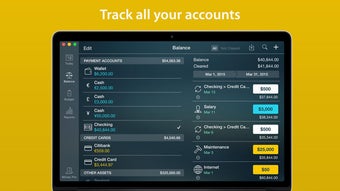
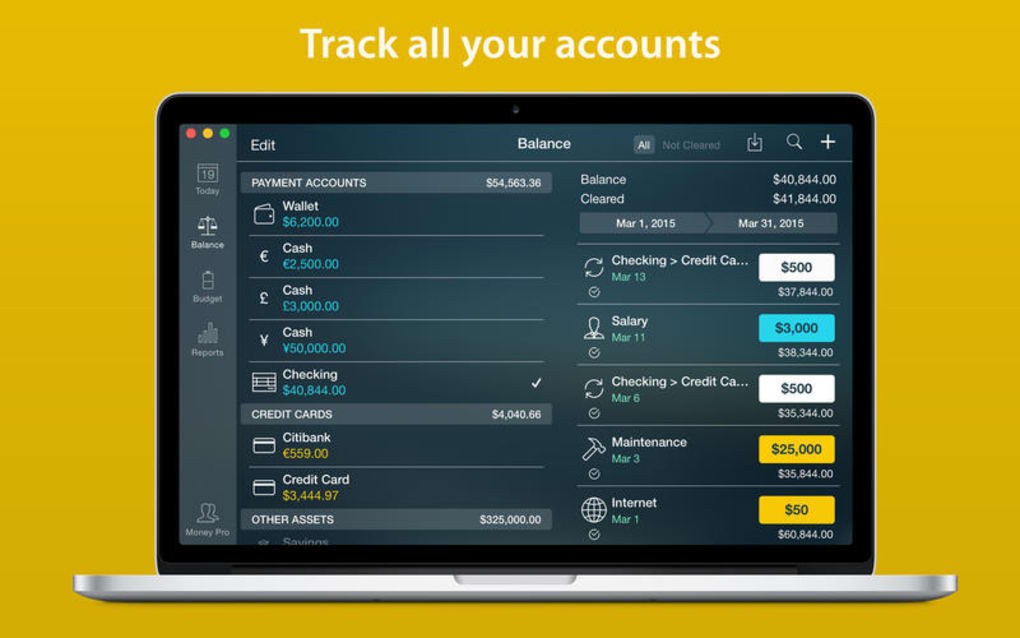
- Multi‑Account Aggregation: Link bank accounts, credit cards, cash wallets, and investment portfolios to see a consolidated net‑worth view.
- Secure Cloud Sync: End‑to‑end encryption ensures that all financial data is safely synchronized across Mac, iPhone, and iPad.
- Customizable Reports: Generate PDF or CSV reports for expenses, income, and cash flow, with filters for date ranges, tags, and categories.
- Currency & Localization Support: Supports over 30 currencies and auto‑detects locale settings for date, number, and language formatting.
- Smart Notifications: Push notifications for upcoming bills, budget thresholds, and unusual spending patterns.
- Touch Bar & Siri Shortcuts: Quick access to add expenses or view budget summaries directly from the MacBook Touch Bar or via voice commands.
- Dark Mode & Accessibility: Fully compatible with macOS dark mode and includes VoiceOver support for visually impaired users.
- Export & Import Tools: Import data from CSV, QIF, or OFX files, making migration from other finance apps painless.
The feature set is designed to grow with the user. Beginners can start with simple expense tracking, while seasoned accountants can take advantage of the detailed reporting engine and custom tag system. Money Pro also integrates with Apple Calendar to automatically add bill due dates, reducing the risk of missed payments. Overall, the combination of automation, security, and flexibility makes Money Pro a compelling choice for anyone looking to gain financial clarity on a Mac platform.
Installation, Usage & Compatibility
Step‑by‑Step Installation
Downloading Money Pro is straightforward. Visit the official iBear LLC website or the Mac App Store, click the “Download” button, and the installer (.dmg) will appear in your Downloads folder. Open the .dmg file, drag the Money Pro icon into your Applications folder, and launch the app. The first launch triggers a brief onboarding wizard that guides you through creating your first budget, adding a bank account, and setting up bill reminders. The wizard also offers an optional import of existing CSV files, making migration from spreadsheets seamless.
Intuitive Usage Workflow
Upon opening Money Pro, the dashboard presents a snapshot of your financial health: total income vs. expenses, upcoming bills, and a quick‑add button for new transactions. Adding an expense is as simple as clicking the “+” icon, selecting a category (e.g., Food, Transportation), entering the amount, and optionally attaching a receipt image. The app automatically tags recurring expenses based on your bill schedule, reducing manual entry. For deeper analysis, navigate to the “Reports” tab where you can filter by month, category, or account and visualize trends through bar and line charts.
System Requirements & Operating System Support
Money Pro requires macOS 11.0 (Big Sur) or later, with at least 4 GB of RAM and 200 MB of free disk space for the core application. The companion iOS app supports iOS 14.0+ and iPadOS 14.0+, allowing seamless sync via iCloud. Because the software uses Apple’s native encryption frameworks, it runs efficiently on both Intel‑based Macs and Apple Silicon (M1/M2) devices without performance degradation. Users with older macOS versions (e.g., Catalina) will receive a notification prompting an OS upgrade before installation, ensuring that the security standards of Money Pro are upheld.
Keeping the App Updated
Money Pro checks for updates automatically each time the app launches. When a new version is available, a discreet banner appears, offering a one‑click “Update Now” option. Updates typically include bug fixes, new feature rollouts, and security patches. For users who prefer manual control, the “Check for Updates” option is located under the “Help” menu, allowing you to download the latest installer directly from iBear’s servers.
Pros & Cons
What Users Love
- All‑in‑one finance management eliminates the need for multiple apps.
- Robust encryption and iCloud sync keep data secure and always available.
- Highly customizable budgeting tools cater to both novices and experts.
- Native macOS integration delivers a smooth, responsive user experience.
- Multi‑language support broadens accessibility across regions.
Areas for Improvement
- Limited direct bank integration; users must import statements manually.
- No built‑in investment tracking beyond simple portfolio totals.
- One‑time purchase price may be a barrier for budget‑conscious users.
- Advanced reporting requires a learning curve for non‑technical users.
- Mobile companion app lacks some desktop‑only features like custom tag creation.
Money Pro delivers a polished, secure, and feature‑rich finance solution for Mac users. Its intuitive interface, strong encryption, and comprehensive budgeting tools outweigh the minor drawbacks of limited bank linking and a higher upfront cost.
Frequently Asked Questions
-
Is Money Pro free to use?
Money Pro offers a 30‑day free trial that unlocks the full feature set. After the trial, a one‑time purchase of $49.99 is required to continue using the app without limitations.
-
Can I sync Money Pro with my iPhone?
Yes. Money Pro uses iCloud to sync data securely between macOS and iOS devices. Simply install the companion app from the App Store and log in with the same Apple ID.
-
Does Money Pro support multiple currencies?
Absolutely. The app supports over 30 currencies and automatically applies exchange rates when you view consolidated reports.
-
How secure is the data stored in Money Pro?
Money Pro uses end‑to‑end AES‑256 encryption for all data in transit and at rest. Your iCloud keychain safeguards the encryption keys, ensuring only you can access your financial information.
-
Can I import data from other finance apps?
Yes. Money Pro accepts CSV, QIF, and OFX formats, allowing you to migrate data from apps like Mint, YNAB, or Quicken with minimal effort.
Conclusion & Call to Action
Money Pro stands out as a robust, secure, and visually appealing finance manager for macOS users who demand both simplicity and depth. Its comprehensive bill tracking, dynamic budgeting, and seamless iCloud sync make daily money management effortless, while the rich reporting tools provide the analytical power needed for serious budgeting. Although the lack of direct bank integration and a higher upfront cost might give some pause, the overall value—especially for users who appreciate a native Mac experience—justifies the investment.
If you’re ready to gain full control over your finances, download Money Pro today and start your free trial. Experience the confidence that comes from having every bill, budget, and account perfectly organized on your Mac.







